Configuring Job Schedule Frequency
Use the Job Schedule Frequency section of the Extended Command Options page to define job recurrence patterns and details for each job schedule in your system. When an FMS Schedule Jobs command is run for the selected schedule, the associated job schedule frequency is used to automatically schedule jobs for CygNet Dispatch. Job schedule frequency can be configured as fixed (static) or variable (data-based).
Job Schedule Frequency
Defining job schedule frequency is part of configuring a job schedule. Each schedule includes frequency properties that define how often to schedule a new job, the day a job is required to be complete, and how long the job is made available to those performing the job. For variable frequency jobs, which are based on averaged data values, the schedule also defines what data item and averaging period to use to provide the averaged data value that is compared to defined threshold data ranges to determine which job schedule frequency to use.
Fixed
The Fixed job schedule frequency creates jobs based on a simple user-defined recurrence cycle. Configure the parameters for the job schedule, and jobs matching the parameters will be created and scheduled when the Schedule Jobs command runs. If no jobs currently match the constraints, no jobs will be created when the command runs, but the job schedule will still be present; it will just not create any jobs.
Variable
The Variable job schedule frequency creates jobs based on a system-averaged data value and its associated recurrence cycle. This variable frequency is based on user-defined data value thresholds, for a user-specified data type, therefore a variety of scheduled job frequencies could result depending on the averaged data value calculated by the system. Configure the property fields associated with each data threshold value range for a schedule, and jobs will be created at the frequency associated with the threshold range the system-calculated value falls within.
Job Schedule Frequency Parameters
Select a schedule in the top pane of the Job Schedule Configuration page to define the frequency to use when scheduling its resultant jobs. This applies to adding a new job schedule definition, or to editing or deleting an existing definition.
In the Job Schedule Frequency section, in the bottom pane, click Fixed or Variable to access configuration options to create a recurrence pattern of the type desired for the selected job schedule.
Fixed Job Frequency
To configure a fixed job frequency to use when the Schedule Jobs command is run using the selected job schedule, describe details for the job recurrence pattern, required by day if applicable, and job availability time.
|
Fixed Job Frequency |
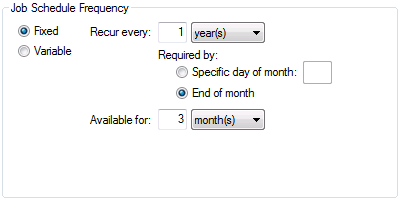
Possible values for fixed job frequency properties are as follows.
| Fixed Frequency Property | Description |
|---|---|
|
The recurrence pattern increment between scheduled jobs Enter a numerical value and time unit. Possible values are as follows.
This property is required. |
|
|
For monthly or yearly recurrence patterns, the day of the month on which the job is required to be complete Possible values are as follows.
This property is required. |
|
|
The length of time the job will be available to be done, prior to the day on which the job is required to be complete Enter a numerical value and time unit. Possible values are as follows.
This property is required. |
Variable Job Frequency
To configure a variable job frequency to use when the Schedule Jobs command is run using the selected job schedule, provide data value and threshold information.
First click to select a value from the data type drop-down list and its associated units, and then enter a value for the number of months into the data averaging period text box. For volume data types, also define a calculation type to use (average or summation). This defines how the averaged data value is determined by the system.
Next define threshold ranges and scheduling details, including upper thresholds and their associated job recurrence pattern, required by day if applicable, and job availability time. These ranges are used for comparison with the averaged data value calculated. Value comparisons are inclusive. When the averaged value falls within a defined threshold range, or is equal to the upper threshold value, the system will schedule jobs according to the associated job frequency properties for that range.
|
Variable Job Frequency |
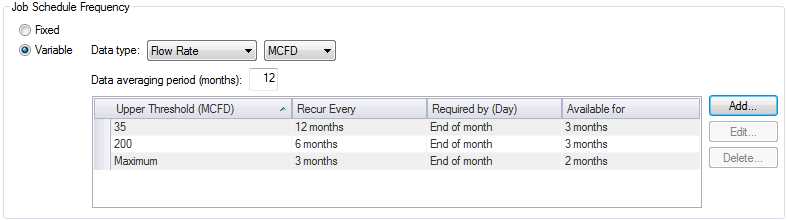
Possible values for variable job frequency properties are as follows.
| Variable Frequency Property | Description |
|---|---|
|
Used to determine the frequency of jobs, in conjunction with the data averaging period and data thresholds Select both the type of data item, and its associated units, for which to average previous data values to yield an averaged value for comparison to the data threshold ranges. If Volume is selected, a Calc type selector will also be presented. Note: For devices which are FMS station meters, data values are as found in the database, and are not modified by associated normalization views. This property is required. |
|
|
For data type values of Volume, defines the calculation type to use, in conjunction with the data type and data thresholds, to determine the averaged data value Select the type of calculation to use, either Average or Summation, from the drop-down menu. This calculation method will be used to process data within the specified data averaging period when establishing thresholds. This property is required for Volume data types. |
|
|
Used to determine the recurrence of jobs, in conjunction with the data type and data thresholds Enter the number of months for which to average previous data values to yield an averaged value for comparison to data threshold ranges. This property is required. |
|
|
[Data thresholds table] |
Defines threshold values against which the specified averaged data value is compared Used to determine the job schedule frequency, in conjunction with the data type and data averaging period |
|
Upper values for data threshold ranges Threshold values are used to determine job schedule frequency by comparing an averaged data value to data threshold ranges defined here. See Adding, Editing, or Deleting a Data Threshold for more information. Note: Threshold value comparisons are inclusive; averaged values equal to the upper threshold value or within the defined threshold range will use the associated job frequency properties. This property is required. |
|
|
The recurrence pattern increment between scheduled jobs Enter a numerical value and time unit. Possible time unit values are as follows.
This property is required. |
|
|
For monthly or yearly recurrence patterns, the day of the month on which the job is required to be complete Possible values are as follows.
This property is required. |
|
|
The length of time the job will be available prior to the day on which the job is required to be complete Enter a numerical value and time unit. Possible values are as follows.
This property is required. |
Adding, Editing, or Deleting a Data Threshold
Use the Add, Edit, and Delete buttons to create new or edit existing data value thresholds, or delete existing thresholds, for data-dependent variable frequency jobs. Once a threshold is deleted from the list, the range of the next lowest threshold expands to include those values unless another threshold is defined.
Adding or Editing a Threshold
Click Add or Edit to access a dialog box to set upper threshold data values and associated job frequency properties.
|
Adding or Editing a Threshold |
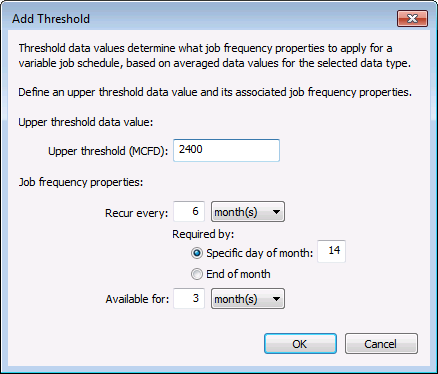
Enter a data value to define the upper threshold of a data range. When the calculated average for the specified data type falls within the range between this upper threshold value and the next smaller value defined (or 0, if there are no smaller upper threshold values), the associated job frequency properties will be used when scheduling jobs using this job schedule.
Define associated job frequency properties for the data range, to describe details for the job recurrence pattern, a required by day if applicable, and a job availability time.
Deleting a Threshold
Use the Delete button to remove existing upper threshold values. When a threshold is deleted from the list, the adjoining value range expands down to the next smallest threshold defined (or 0 if there is no smaller threshold).
To delete, select an upper threshold entry in the list, and then click Delete to remove it. A confirmation dialog appears to make sure you want to make the deletion.


